OnVu3601.1.1
Publisher Description
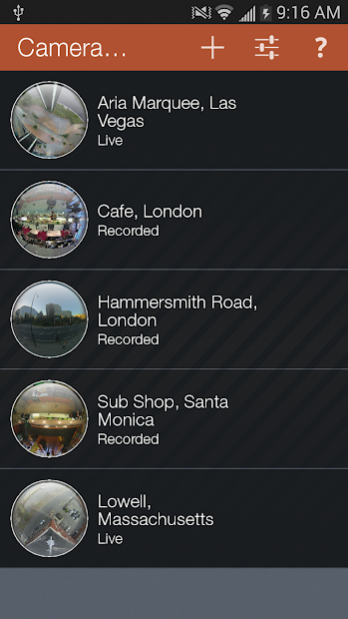
OnVu360 is a world’s first - A mobile application, that enables users to fully experience high resolution 360-degree video. It is a truly groundbreaking experience that you need to see and touch, to believe.
Never before have you had the ability to monitor your 360-degree cameras in real time, enabling anytime access to the information that matters most. Navigate 360-degree video with zero latency using the pinch to zoom features of an Android device. The OnVu360 app can stream up to a full 9.6-megapixels and supports Oncam's Evolution 5-megapixel and 12-megapixel line of cameras. Streaming over Wi-Fi, 3G and 4G/LTE connectivity.
Features:
• Oncam's advanced dewarping technology, providing the ultimate 360-degree experience
• Access to demo cameras from real customer sites showcasing Oncam’s award winning 360-degree cameras in action
• Custom list of camera profiles to monitor all of your Oncam IP cameras
• Grouping of cameras to provide easy navigation
• Support for up to 9.6MP camera streams on Evolution 12 and 5MP streams on Evolution 5
• Support for Oncam’s full line of IP cameras
• Touch command based 360-degree experience
• Shake to reset current dewarped stream
• Support for either the primary or secondary stream through camera profile creation
About OnVu360
The company that develops OnVu360 is ONVU Technologies. The latest version released by its developer is 1.1.1.
To install OnVu360 on your Android device, just click the green Continue To App button above to start the installation process. The app is listed on our website since 2019-05-23 and was downloaded 19 times. We have already checked if the download link is safe, however for your own protection we recommend that you scan the downloaded app with your antivirus. Your antivirus may detect the OnVu360 as malware as malware if the download link to com.oncamgrandeye.onvu is broken.
How to install OnVu360 on your Android device:
- Click on the Continue To App button on our website. This will redirect you to Google Play.
- Once the OnVu360 is shown in the Google Play listing of your Android device, you can start its download and installation. Tap on the Install button located below the search bar and to the right of the app icon.
- A pop-up window with the permissions required by OnVu360 will be shown. Click on Accept to continue the process.
- OnVu360 will be downloaded onto your device, displaying a progress. Once the download completes, the installation will start and you'll get a notification after the installation is finished.
Program Details
System requirements
Download information
Pricing
Version History
version 1.1.1
posted on 2019-05-23
**Full Support for Oncam’s recently released Evolution 12 line of cameras. Get more detail than ever before with Live Viewing of Evolution 12’s 9.6-Megapixel video stream. Get the full 360-degree experience with Evolution 12 and the OnVu360 Mobile App**
. Added notifications to app to shares information with users such as available updates etc.
. General bug fixes.
version 1.1.0
posted on 2016-01-27
**Full Support for Oncam’s recently released Evolution 12 line of cameras. Get more detail than ever before with Live Viewing of Evolution 12’s 9.6-Megapixel video stream. Get the full 360-degree experience with Evolution 12 and the OnVu360 Mobile App**,• Removed in-app purchasing option, enabling users to add custom camera profiles completely free of charge.,• Performance enhancements and improvements.,• General bug fixes.
